Tailorbird
An AI agent that tailors resumes for every role, on autopilot which stitches leaves into a nest, this one stitches your experience to fit each job.
On this page
- Table of contents
- Why Tailorbird (inspiration & who it helps)
- Quick start
- UI Overview
- How it works — a 4-step walkthrough
- 1. Start with your queue
- 2. Add a job URL
- 3. Run the agent — and watch it work, live
- 4. Collect the tailored résumé
- Prerequisites
- Installation (step by step, per device)
- 1. Install the prerequisites
- 2. Get the code
- 3. Install the tailoring skill
- 4. Create your library + base résumés (your data, not in the repo)
- 5. Run it
- Architecture
- Directory layout
- Data model
- `job_queue.json`
- Statuses (lifecycle)
- `resumes/_index/LIBRARY.md`
- Résumé files
- The agent pipeline (detail)
- The eligibility / fit screen
- Token & time optimizations
- The tracker UI
- HTTP API reference
- Component reference
- `agent/run.py`
- `agent/ats.py`
- `agent/screen.py`
- `agent/library.py`
- `agent/report.py`
- `agent/schedule.py`
- `tracker/update_queue.py`
- `resumes/_assets/build_resume.py`
- The `/resume-tailoring` skill
- Running it
- Customize it for you
- Safety guarantees
- Extending the system
- Troubleshooting
- Known limitations
- License & contributing
Tailored résumés for every role, on autopilot. (Named for the tailorbird, which stitches leaves into a nest, this one stitches your experience to fit each job.)
An end-to-end system that turns a job-posting URL into a tailored, one-page résumé (PDF + DOCX) with factual integrity, and does it autonomously at scale. You paste URLs into a local web tracker, click Run agent, and come back to finished résumés, dropped roles (with reasons), and a short list of judgment calls for you to decide.
It has three cooperating parts:
- The
/resume-tailoringskill — a Claude Code skill that is the single source of truth for how a résumé is tailored (research, archetype selection, matching, one-page generation, truthfulness rules). A copy is vendored inskill/so anyone can read and edit it; at runtime Claude Code loads it from~/.claude/skills/resume-tailoring/. See The skill. - The agent (
agent/) — a pure-Python orchestrator that does all the mechanical, token-free work (fetch each JD, screen eligibility, assemble a compact context, commit results) and invokes the real skill headlessly (claude -p) only for the actual authoring. - The tracker (
tracker/) — a stdlib HTTP server + single-file web UI that is the control surface: add URLs, run the agent, watch live logs, review borderline roles, open/copy résumés, and manage a background schedule.
The candidate's reusable knowledge (facts, résumé archetypes, boundaries, metrics) lives
in resumes/_index/LIBRARY.md, and every generated résumé is stored under
resumes/{Company}/.
Table of contents
- Why Tailorbird (inspiration & who it helps)
- Quick start
- How it works — a 4-step walkthrough
- Prerequisites
- Installation (step by step, per device)
- Architecture
- Directory layout
- Data model
- The agent pipeline (detail)
- The eligibility / fit screen
- Token & time optimizations
- The tracker UI
- HTTP API reference
- Component reference
- The
/resume-tailoringskill - Running it
- Customize it for you
- Safety guarantees
- Extending the system
- Troubleshooting
- Known limitations
- License & contributing
Why Tailorbird (inspiration & who it helps)
The idea. Whether you get an interview should depend on your experience and capabilities, not on how much time you can spend rewriting a résumé for every posting. Tailoring one résumé per role is genuinely valuable — it materially raises callback rates — but doing it well, for dozens of roles, is slow, repetitive work that punishes people who have less time (working parents, people in demanding jobs, international applicants writing in a second language). Tailorbird automates that labor while keeping a hard line on honesty: it reframes and emphasizes what's genuinely yours, and it never invents experience.
The name. The tailorbird stitches leaves together to build its nest. This one stitches your real experience to fit each job.
What inspired it.
- The tailoring method comes from the open-source
/resume-tailoringClaude Code skill (MIT, by Varun R). Tailorbird wraps that skill in automation rather than reinventing it, so quality equals a careful, hand-guided session. - The agent-over-skill design (deterministic Python for the mechanical 80%, the model only for authoring) came from watching where tokens and time actually went, and from the skill's own "token optimization" guidance.
- The human-in-the-loop
needs_reviewvalve exists because some calls (an unusual level, a missing must-have, a borderline fit) genuinely need a person — so the agent parks those instead of guessing.
Who benefits.
- High-volume job seekers — apply to many roles without the per-role grind; a batch that took an evening now runs in minutes while you do something else.
- Career switchers — the archetype/reframing engine surfaces transferable experience for roles adjacent to your background.
- Non-native résumé writers — get clean, idiomatic, role-matched phrasing without fighting the blank page.
- Busy people — schedule it; results and a review list are waiting when you're back.
- Anyone who values honesty — truthfulness boundaries are enforced; it will flag a poor fit rather than pad it.
Quick start
# 1. Start the tracker (opens http://localhost:8765 in your browser)
python3 tracker/tracker.py

# 2. In the UI: paste one or more job URLs → "Add to queue" → "Run agent".
#    Watch progress on the Logs tab; review any "needs review" rows.

# 3. Or run the agent from the CLI:
python3 agent/run.py --dry-run          # classify the queue, write nothing
python3 agent/run.py --once             # process the queue (default concurrency 3)
python3 agent/run.py --only "<url>"     # process a single queued URL
UI Overview
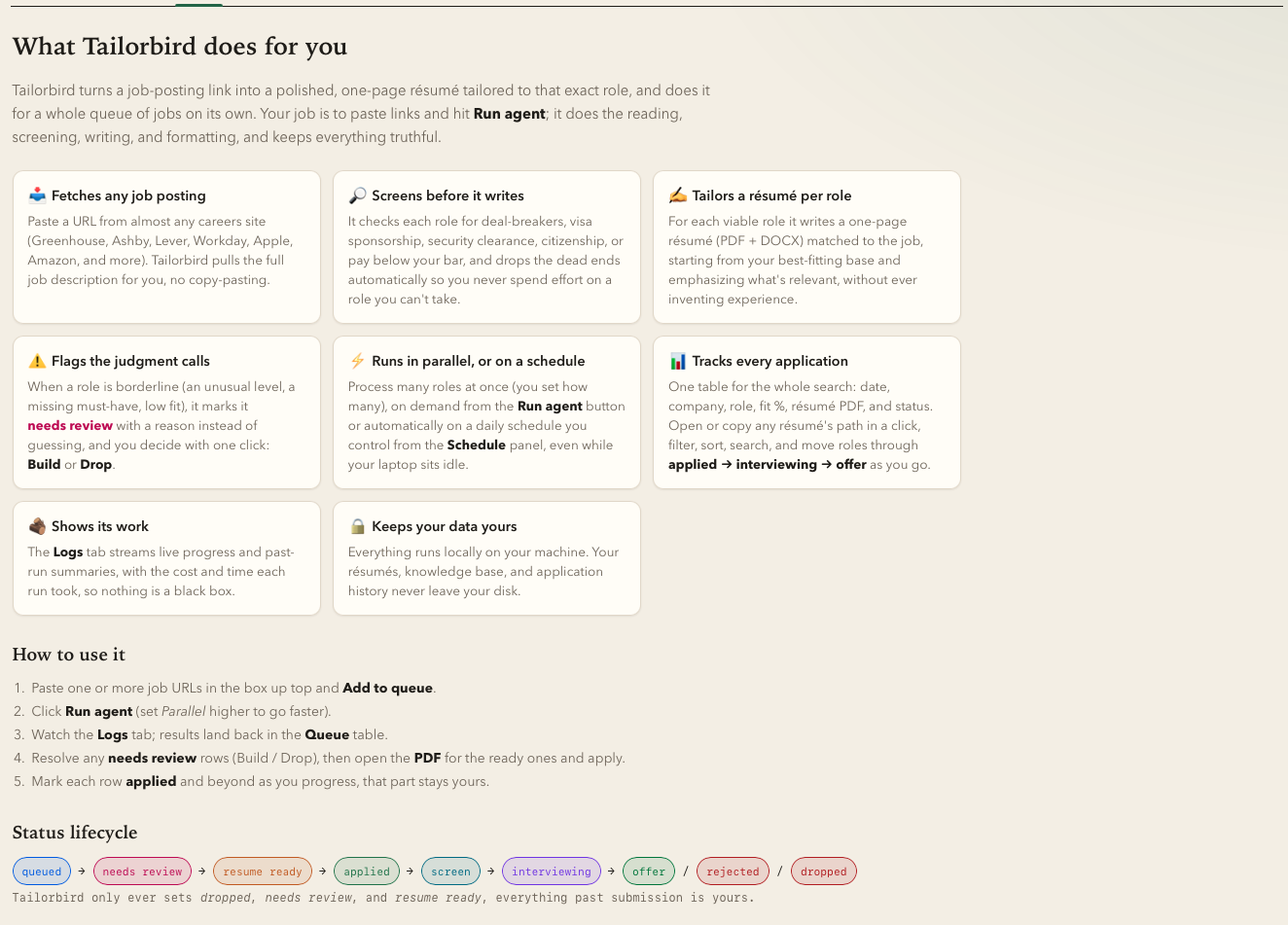
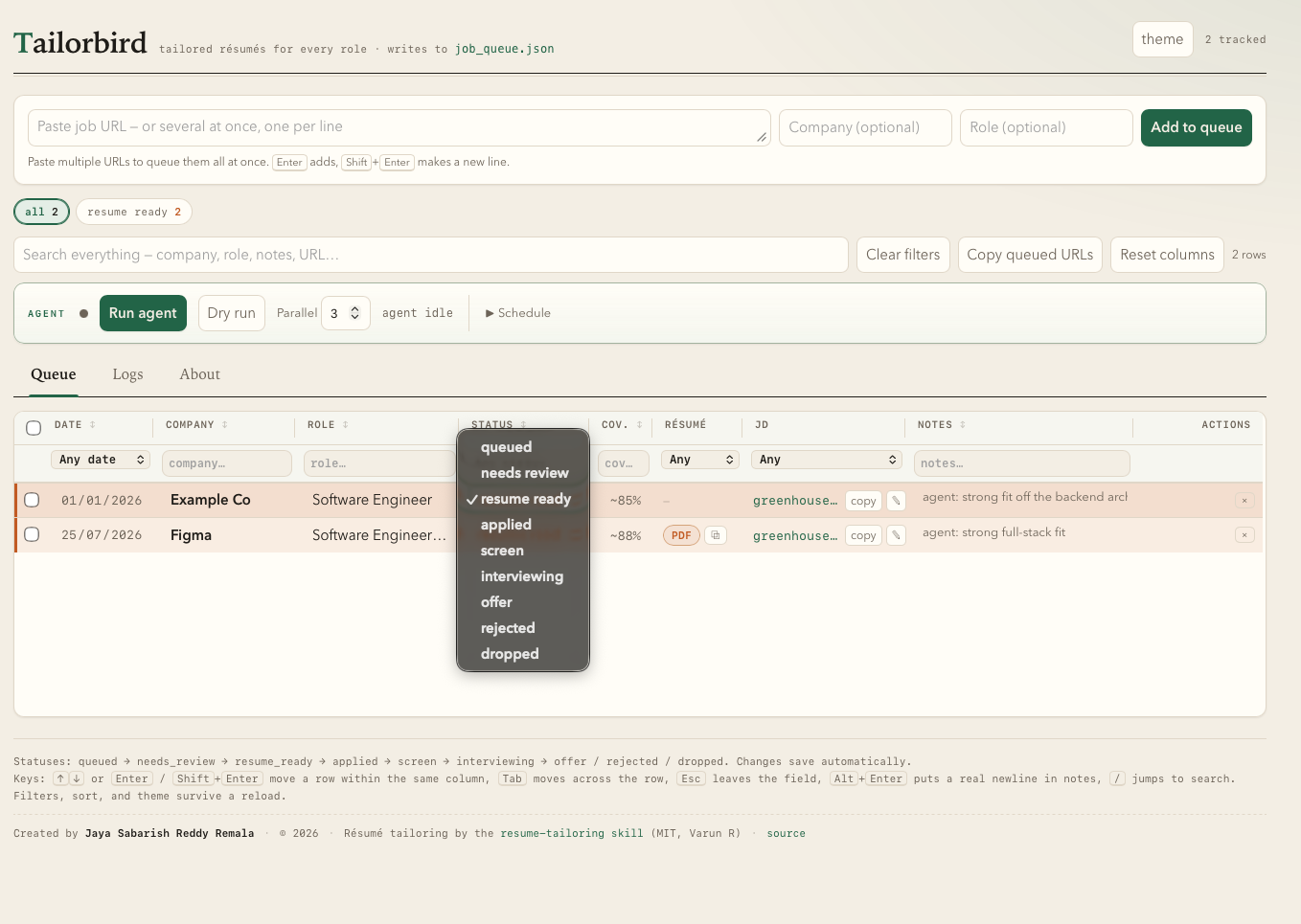
How it works — a 4-step walkthrough
The whole loop is: paste a job URL → click Run agent → watch it work live → collect the tailored résumé. Here it is end-to-end in the tracker UI (screenshots use a sanitized demo queue).
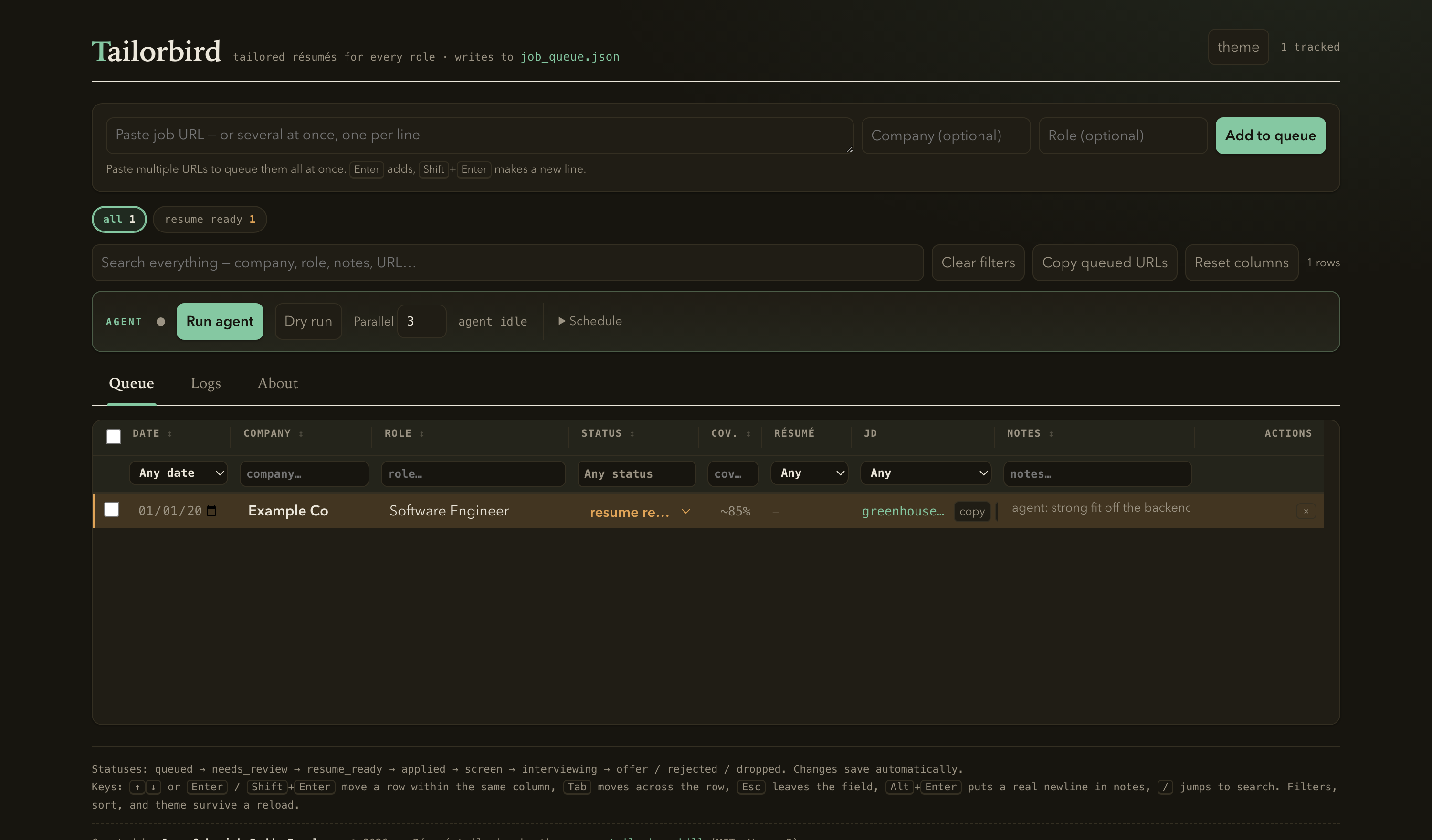
1. Start with your queue
Launch the tracker (python3 tracker/tracker.py) and open http://localhost:8765. The top
bar is where you paste job URLs; below it the agent bar (Run agent / Dry run /
parallelism / Schedule) and the Queue / Logs / About tabs. The queue is a dense,
inline-editable ledger — every field autosaves.
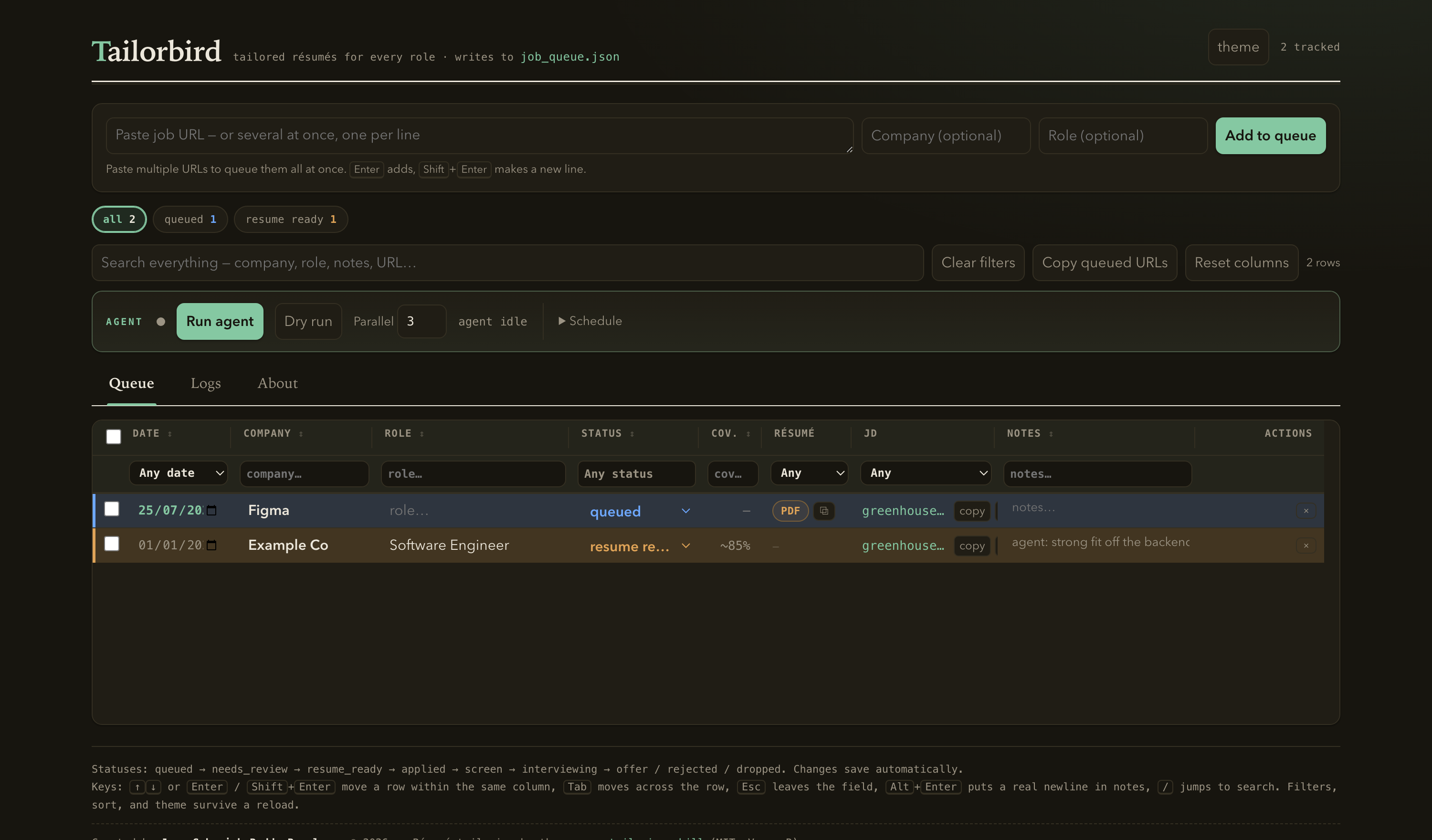
2. Add a job URL
Paste one or more posting URLs into the box and hit Add to queue (or just Enter). A
new row lands with status queued — no company or role yet; the agent fills those in
when it fetches the posting. Here a Figma role has been queued.
3. Run the agent — and watch it work, live
Click Run agent. Tailorbird jumps to the Logs tab and streams a live, timestamped feed of exactly what it's doing right now — fetching the JD, screening eligibility, then, inside the résumé skill, reading the kit, authoring the résumé, and building the PDF/DOCX. Each tool call becomes one readable line (🔎 research · 📖 read · ✍️ edit · 🖨️ build). The right rail lists past runs and a plain-language legend of the stages.
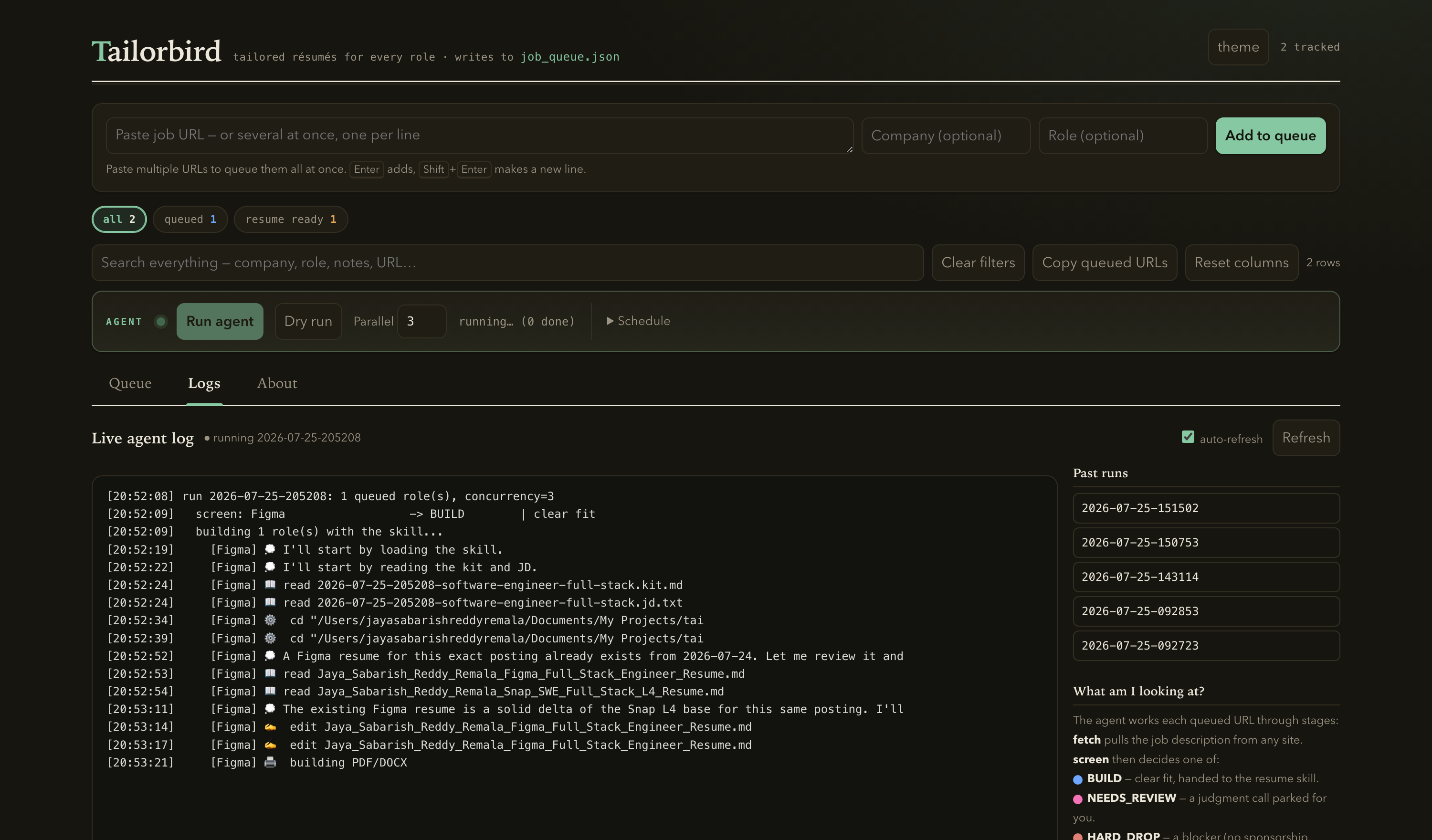
When the role finishes, the banner flips to idle with the run's totals, and the log prints the outcome plus a breakdown of where the time went — so the bottleneck is obvious at a glance:
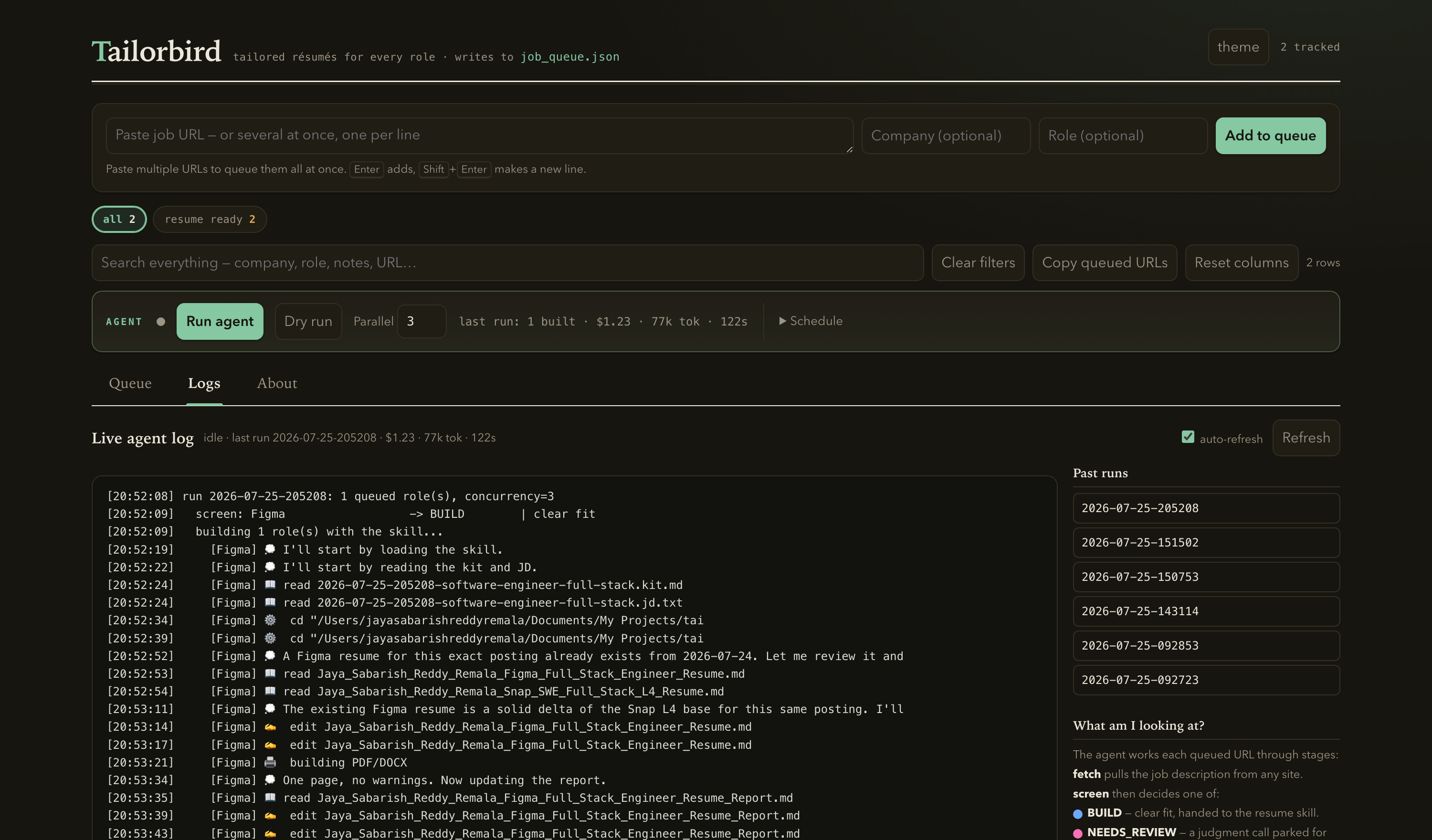
  BUILT        Figma (~88%) · $1.23 · 77k new tok · 122s
    [Figma] breakdown: 0 web search(es) · 1 PDF build(s) · 17 turns
(This exact run: one page on the first try — a single PDF build — in 122 seconds.) The agent
only ever sets dropped, needs_review, or resume_ready — everything from applied
onward stays yours.
4. Collect the tailored résumé
The row flips to resume_ready with a coverage estimate and a PDF pill (opens the
one-page résumé) plus a copy-path button. The DOCX and a coverage/gaps report are written
alongside it under resumes/{Company}/.
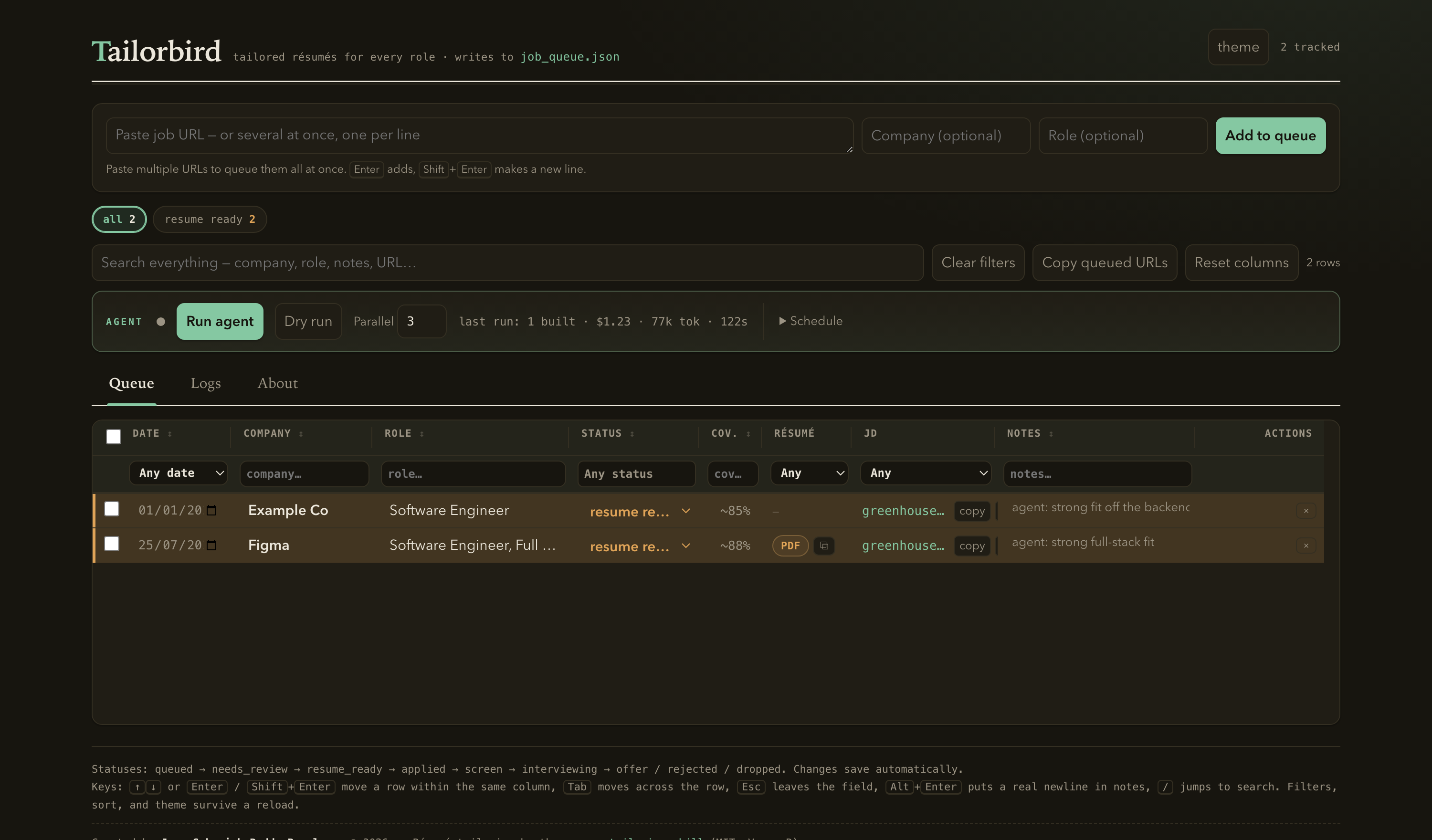
That's the entire loop. Queue a dozen URLs, click once, and come back to finished résumés
plus a short list of any borderline roles parked in needs_review for you to judge.
Prerequisites
| Dependency | Why | Notes |
|---|---|---|
| Python 3 | tracker + agent (standard library only, no pip install) | tested with the system/anaconda python |
Claude Code CLI (claude, v2.x) | the agent invokes the real skill headlessly | must be logged in; claude -p is used |
/resume-tailoring skill | defines all tailoring quality | vendored in skill/; install to ~/.claude/skills/resume-tailoring/ (see below) |
Node.js + global docx package | resumes/_assets/gen_docx.js builds the DOCX | npm i -g docx (auto-located; override with TAILORBIRD_DOCX) |
| Google Chrome / Chromium | headless PDF rendering in build_resume.py | auto-detected on macOS/Linux/Windows; override with TAILORBIRD_CHROME |
| macOS (for scheduling) | launchctl background schedule; qlmanage previews | the agent itself is cross-platform; only schedule.py is macOS-specific |
The tracker and agent are stdlib-only Python — nothing to install for them. The only
installs are the global npm docx package and Chrome.
Installation (step by step, per device)
Platform support at a glance:
| Platform | Tracker + agent + résumé build | Background schedule | Notes |
|---|---|---|---|
| macOS | ✅ full | ✅ launchctl | reference platform; works out of the box |
| Linux | ✅ full | ⚠️ use cron/systemd instead of schedule.py | Chrome/Chromium auto-detected; override with TAILORBIRD_CHROME if needed |
| Windows | ✅ via WSL2 (recommended) | ⚠️ Task Scheduler instead of schedule.py | run everything inside WSL for the Unix tooling |
1. Install the prerequisites
macOS (with Homebrew):
brew install python node gh                 # Python 3, Node, GitHub CLI
brew install --cask google-chrome           # headless PDF rendering
npm install -g docx                         # DOCX generator dependency
# Claude Code CLI (if not already installed): see https://claude.com/claude-code
claude --version                            # confirm the `claude` CLI is on PATH + logged in
Linux (Debian/Ubuntu):
sudo apt update && sudo apt install -y python3 nodejs npm
# install Google Chrome (or Chromium) and note its binary path
sudo apt install -y chromium-browser        # or install google-chrome-stable
npm install -g docx
# build_resume.py auto-detects Chromium/Chrome on PATH. If yours is in an unusual
# location: export TAILORBIRD_CHROME="/path/to/your/chrome"
Windows: install WSL2 (Ubuntu), then follow the Linux steps inside WSL. Install
Chrome in WSL, or set TAILORBIRD_CHROME to a reachable Chrome binary.
You also need the Claude Code CLI logged in (claude) — that's what actually authors
the résumés. See https://claude.com/claude-code.
2. Get the code
git clone https://github.com/sabarishreddy99/tailorbird.git
cd tailorbird
3. Install the tailoring skill
Claude Code loads the skill from your skills directory, so copy the vendored copy there:
mkdir -p ~/.claude/skills/resume-tailoring
cp -R skill/. ~/.claude/skills/resume-tailoring/
# In Claude Code, /resume-tailoring should now be listed as a skill.
4. Create your library + base résumés (your data, not in the repo)
The repo ships sanitized templates; your real data stays local and git-ignored.
# a) Your knowledge base:
cp resumes/_index/LIBRARY.example.md resumes/_index/LIBRARY.md
# Edit LIBRARY.md: your Candidate Facts, the Role Archetypes table, Truthfulness
# Boundaries, metrics, etc. (see "Customize it for you" below).

# b) At least one base résumé per archetype, in the canonical Markdown format.
#    Copy the annotated template and fill in YOUR experience:
mkdir -p resumes/Backend
cp resumes/_assets/RESUME_TEMPLATE.example.md resumes/Backend/base_backend.md
#    The template documents the exact format build_resume.py parses. The folder/file
#    names must match the paths in your Role Archetypes table in LIBRARY.md.

# c) Confirm the build tooling works end-to-end:
python3 resumes/_assets/build_resume.py resumes/Backend/base_backend.md
#    → writes base_backend.pdf (auto-fit to one page) + base_backend.docx next to it.
Tip — let the skill bootstrap your library. Instead of filling
LIBRARY.mdby hand, open Claude Code in the repo and run/resume-tailoringwith your current résumé; the skill interviews you, discovers experience, and can populate the archetypes, metrics, and boundaries for you.
job_queue.json is created automatically on first run (or cp job_queue.example.json job_queue.json).
5. Run it
python3 tracker/tracker.py # opens http://localhost:8765
Paste a job URL, Add to queue, Run agent. First run confirms the whole chain works: fetch → screen → skill authoring → PDF/DOCX → tracker row.
Chrome detection:
build_resume.pyauto-finds Google Chrome or Chromium on macOS, Linux, and Windows. If your binary lives somewhere unusual, setTAILORBIRD_CHROME(e.g.export TAILORBIRD_CHROME="/usr/bin/chromium-browser") — no source edit needed.
Architecture
                    ┌───────────────────────── Tracker UI (browser) ─────────────────────────┐
                    │  add URLs · Run agent · Logs tab · needs_review review · Schedule panel   │
                    └───────────────┬───────────────────────────────┬──────────────────────────┘
                                    │ POST /api/run-agent            │ POST /api/schedule
                                    ▼                                ▼
                        tracker/tracker.py  ──spawn──►      agent/schedule.py ──►  launchd plist
                        (localhost:8765, stdlib)                                  (background runs)
                                    │
                                    ▼   python3 agent/run.py --once --concurrency N
   ┌──────────────────────────── agent/run.py (orchestrator, pure Python, 0 tokens) ───────────────────────────┐
   │ 1. load queue        job_queue.json → rows where status == "queued"                                        │
   │ 2. fetch JD          agent/ats.py    → any ATS host (Greenhouse/Ashby/Lever/Workday/... + generic fallback)│
   │ 3. screen            agent/screen.py → HARD_DROP | NEEDS_REVIEW | BUILD   (regex, no model)   [PARALLEL ≤8]│
   │      ├─ HARD_DROP    → tracker: dropped        + LIBRARY history row                                       │
   │      ├─ NEEDS_REVIEW → tracker: needs_review   + reason                                                    │
   │      └─ BUILD ▼                                                                                            │
   │ 4. build kit         agent/library.py → compact context (archetype + base résumé + boundaries)            │
   │ 5. author            claude -p  "/resume-tailoring …"  (the REAL skill authors md+report+pdf) [PARALLEL ≤N]│
   │ 6. gate + commit     deterministic checks (page count, em-dash, ...) → tracker: resume_ready + LIBRARY row │
   │ 7. report            agent/report.py → agent/runs/<ts>.md + status.json (+ per-role cost/tokens/time)      │
   └────────────────────────────────────────────────────────────────────────────────────────────────────────┘
                                    │
                                    ▼  build tooling (reused, no LLM)
                    resumes/_assets/build_resume.py  → PDF (headless Chrome, 1-page auto-fit) + DOCX (gen_docx.js)
Key idea: ~80% of the work is deterministic (fetch, screen, build, commit) and runs as plain Python at zero tokens and zero permission prompts. The model is invoked only to author each surviving résumé, over a compact pre-assembled context, so cost and latency stay low while quality stays identical to a careful interactive session.
Directory layout
tailorbird/
├── README.md                      ← this file
├── job_queue.json                 ← the live application queue (one record per role)
├── job_queue.json.lock            ← advisory lock (flock) for concurrent writers
│
├── agent/                         ← the autonomous orchestrator (pure Python)
│   ├── run.py                     ← entry point / CLI; drives the whole pipeline
│   ├── ats.py                     ← fetch a JD from any posting URL (adapters + generic fallback)
│   ├── screen.py                  ← regex eligibility/fit classifier → HARD_DROP|NEEDS_REVIEW|BUILD
│   ├── library.py                 ← builds the compact per-role "kit" from LIBRARY.md
│   ├── report.py                  ← run-log (agent/runs/<ts>.md) + status.json + telemetry
│   ├── schedule.py                ← macOS launchd install/enable/disable/status
│   └── runs/                      ← run-logs, status.json, per-run .log, staging/ scratch
│
├── tracker/                       ← the control-surface web app (stdlib)
│   ├── tracker.py                 ← HTTP server (localhost:8765) + JSON API
│   ├── tracker.html               ← single-file UI (HTML/CSS/JS, no build step)
│   └── update_queue.py            ← CLI upsert into job_queue.json (used by the skill/agent)
│
├── skill/                         ← vendored /resume-tailoring skill (3rd-party, MIT)
│   ├── skills/resume-tailoring/SKILL.md   ← the skill itself
│   ├── matching-strategies.md · research-prompts.md · branching-questions.md
│   ├── multi-job-workflow.md · docs/ · LICENSE · .claude-plugin/plugin.json
│
└── resumes/                       ← the résumé library
    ├── _index/LIBRARY.md          ← candidate knowledge base (facts, archetypes, boundaries…)
    ├── _assets/
    │   ├── build_resume.py        ← one-command MD → PDF + DOCX
    │   ├── gen_docx.js            ← docx-js generator (needs global npm 'docx')
    │   └── RESUME_TEMPLATE.example.md  ← annotated base-résumé template (copy to start)
    ├── {Company}/                 ← per-company: <Name>_<Company>_<Role>_Resume.md/.docx/_Report.md
    └── pdfs/{Company}/            ← submission-ready PDFs
A fresh clone ships only the reusable system — code, the vendored skill, and the
*.example.* templates. The per-company résumé folders, pdfs/, your real LIBRARY.md,
and job_queue.json are all git-ignored; they appear locally as you use the tool (the
author's own tree, for reference, holds ~85 company folders and ~100+ PDFs).
Data model
job_queue.json
The single source of truth for application lifecycle. Shape:
{
  "jobs": [
    {
      "id": "2026-07-25-figma-3",
      "date": "2026-07-25",
      "company": "Figma",
      "role": "Software Engineer, Full Stack",
      "coverage": "~88%",
      "status": "resume_ready",
      "url": "https://boards.greenhouse.io/figma/jobs/5691911004",
      "notes": "agent: strong full-stack fit",
      "pdf": "Figma/Name_..._Resume.pdf"        // relative to resumes/pdfs (added on build)
    }
  ]
}
pdf_abs (absolute path) is added by the API at read time, not persisted.
Statuses (lifecycle)
queued → needs_review → resume_ready → applied → screen → interviewing → offer / rejected / dropped
- The agent only ever sets
dropped,needs_review, orresume_ready. Everything fromappliedonward is yours to set in the UI. - The tracker has a regression guard: it won't move a status backward (e.g. it won't
reset
appliedback toresume_ready) unless forced.
resumes/_index/LIBRARY.md
The candidate's compact, self-improving knowledge base — read instead of scanning every résumé. Sections include: Candidate Facts, Role Archetypes → Nearest Saved Resume (the archetype→base-résumé table), Discovered Experiences, Truthfulness Boundaries, Style Rules, Core Metrics Bank, Summary Variants, Skills Category Blocks, company-specific research notes, JD Screening Heuristics, and the Application History table. The skill appends to it as it learns.
Résumé files
For each built role: resumes/{Company}/<Name>_<Company>_<Role>_Resume.md (canonical
source), .docx, and _Resume_Report.md (coverage/gaps/reframing notes); the PDF goes
to resumes/pdfs/{Company}/.
The agent pipeline (detail)
python3 agent/run.py runs one pass over the queue:
- Lock — takes
agent/.lock(flock) so two runs never overlap. - Load — reads
job_queue.json, keeps rows withstatus == "queued"(or--only <url>). - Fetch + screen (parallel, pool ≤ 8) — for each row,
ats.fetch(url)returns{title, location, comp, text, removed};screen.classify(job)returns a verdict. - Route the non-builds (serialized in the parent):
HARD_DROP→update_queue.py --status dropped+ a LIBRARY history row. No model call.NEEDS_REVIEW→update_queue.py --status needs_reviewwith a reason. No model call.
- Author the builds (parallel, pool ≤ N, default 3): for each BUILD role,
run_skill():library.build_kit()pre-assembles a compact context (chosen base résumé + archetype table + boundaries + style rules) and a research directive, written to a kit file.- Invokes
claude -p --output-format json --permission-mode bypassPermissions --add-dir <repo>running the real/resume-tailoringskill over the kit + JD. - The skill authors the
.md+ report, builds the PDF/DOCX withbuild_resume.py, and writes a small staging JSON (outcome,company,role,coverage,reason,history_row,md_path,pages). It does not touchjob_queue.jsonorLIBRARY.md(the parent commits those, serialized, to avoid races).
- Quality gate + commit (parent): deterministic checks on the produced
.md(one page perbuild_resume.py, no em-dashes, no literal**inside skills lines). On pass →resume_ready+ PDF path recorded + LIBRARY history appended. On fail →needs_review. - Report:
report.pywritesagent/runs/<timestamp>.mdandstatus.jsonwith per-role and total cost / fresh-tokens / time telemetry.
The eligibility / fit screen
agent/screen.py is pure regex (no model, no network) and encodes the same heuristics a
careful human applies, so obvious cases never cost tokens.
- HARD_DROP (recorded dropped): visa-sponsorship exclusion, security clearance, ITAR/export-control / "U.S. person" required (with an EEO-boilerplate false-positive guard), citizenship-required, or a removed/unretrievable posting.
- NEEDS_REVIEW (parked for the user): entry-level title with no stated comp; comp
ceiling below $100K; a central-language requirement the candidate lacks
(Go/Rust/C++/C#-only, respecting "or / and/or / or similar"); PERM-filing markers
(
#LI-DNI, "foreign equivalent" + corroborator, etc.). - BUILD: everything else → handed to the skill.
The comp parser handles $182,800 - $247,300, $116,000 — $174,000 USD, $215-230K,
and flat ranges, and ignores year ranges like 5-8 years.
Token & time optimizations
The only expensive step is the per-role skill run. It's kept cheap without lowering quality:
- Compact "kit" instead of the whole library —
library.pyslicesLIBRARY.mddown to just the authoring-relevant sections + the one nearest base résumé (~9K tokens vs ~35K for the full library), and tells the run not to re-read the library or scan the résumé folder. This is exactly the skill's own documented token-efficient path, pre-assembled. - Gated research — the JD is already fetched and passed in; web research runs only for unfamiliar companies / new archetypes / low projected coverage.
- Text + grep verification — the one-page/quality check uses
build_resume.py's text output plus deterministic greps, instead of rendering and reading a screenshot. - Honest telemetry —
claude -p --output-format jsonusage is parsed into cost and fresh tokens (input + output + cache-creation), shown per role and per run. Cache reads are tracked separately (they are cheap and would otherwise inflate the number).
The tracker UI
Single HTML file, no build step. Aesthetic: a warm "editorial ledger" with light/dark themes. Features:
- Queue tab — a dense, inline-editable table. Every field (date, company, role,
status, coverage, notes) edits in place and autosaves per-row.
- Résumé column: a PDF pill (opens the résumé in a new tab) and a ⧉ copy-path button (copies the absolute on-disk path).
- Actions column: delete (×), and for
needs_reviewrows, one-click Build (re-queue) / Drop. - Resizable columns: drag a column border to resize, double-click to reset one, "Reset columns" to reset all (widths persist). The table scrolls horizontally when wider than the window.
- Filter/sort: per-column filters (date, company, role, status multi-select, coverage, résumé has/none, JD link, notes), global search, sortable headers, bulk select + set-status / delete.
- Auto-refresh: when the agent updates a row on disk, the table reloads in place and flashes "updated by agent" — but never while you're typing in a field.
- Agent bar — Run agent, Dry run, parallelism control, a live status banner (running / last-run counts + cost/tokens/time), and a Schedule panel (a real on/off toggle; set times + concurrency to install/enable a macOS launchd job entirely from the UI).
- Logs tab — a live tail of the current run, a list of past runs (click to read the summary), and a plain-language legend of the stages/verdicts.
HTTP API reference
Served by tracker/tracker.py on http://localhost:8765 (localhost-only).
| Method | Path | Purpose |
|---|---|---|
| GET | / | the UI (tracker.html) |
| GET | /api/jobs | all rows (+ pdf, pdf_abs, rev) |
| POST | /api/jobs | create one row |
| PATCH | /api/jobs/<id> | update named fields on one row |
| DELETE | /api/jobs/<id> | delete one row |
| GET | /api/rev | {rev, count} cheap change-poll (drives auto-refresh) |
| GET | /api/statuses | the status list (drives the UI dropdowns) |
| POST | /api/run-agent | spawn agent/run.py --once --concurrency N ({concurrency, dry_run}) |
| GET | /api/agent-status | idle/running + counts + totals + per-role results |
| GET | /api/agent-log | live tail of the current/most-recent run log |
| GET | /api/runs | list past run summaries |
| GET | /api/runs/<id> | one run summary (markdown) |
| GET | /api/schedule | launchd schedule state (installed/loaded/times/concurrency) |
| POST | /api/schedule | enable/disable/retime ({action, times, concurrency}) |
| GET | /pdf/<relpath> | serve a résumé PDF inline (path-traversal guarded) |
Component reference
agent/run.py
Orchestrator + CLI. Flags: --once (default), --dry-run, --only <url>,
--concurrency N. Owns the parallel fetch/screen pools, the serialized commit, the
deterministic quality gate (style_violations), telemetry parsing (parse_usage), and
the run lock (agent/.lock).
agent/ats.py
fetch(url) → {title, location, comp, text, removed, source}. Fast-path adapters for
Greenhouse, Ashby, Lever, Workday, Oracle ORC, SmartRecruiters, Apple, Microsoft, Amazon,
plus a generic fallback that sniffs an embedded ATS or extracts page text. Resolves
tricky company-domain gh_jid tokens by trying variants and never false-drops on an
unresolved one (returns "unresolved" → NEEDS_REVIEW rather than "removed").
agent/screen.py
classify(job) → {verdict, reason, comp, years, notes} plus helpers (parse_comp,
sponsorship_block, clearance_block, export_control_block, language_gate,
perm_markers, years_ceiling). Pure regex. Run python3 agent/screen.py for a smoke test.
agent/library.py
build_kit(jd_text, company) → {kit_text, base_rel, archetype, confidence, research}.
Slices LIBRARY.md to authoring-relevant sections, picks the nearest archetype/base by
keyword overlap, and decides whether research should run. Run
python3 agent/library.py <jd_file> <company> to inspect a kit.
agent/report.py
write_status(), write_runlog(), read_status(). Atomic writes so the UI never reads a
half-written file.
agent/schedule.py
status(), enable(times, concurrency), disable(). Generates
~/Library/LaunchAgents/com.tailorbird.scheduler.plist and applies it with
launchctl bootstrap/bootout. CLI: python3 agent/schedule.py status|enable|disable.
tracker/update_queue.py
python3 tracker/update_queue.py --company … --status … --url … [--role --coverage --notes --pdf].
Upserts one row (matches by URL first, then company), holds an flock for concurrency,
and refuses to regress a status. This is how both the skill and the agent write the queue.
resumes/_assets/build_resume.py
python3 resumes/_assets/build_resume.py <resume.md> [--outdir DIR] → PDF (headless
Chrome; auto-fits one page via a line-height density ladder, warns if it still overflows)
- DOCX (via
gen_docx.js). Prints an authoritative text signal (N page(s),UNDERFILLED,WARNING) that the agent's gate relies on. Chrome is auto-detected (override:TAILORBIRD_CHROME). The canonical input format is documented inresumes/_assets/RESUME_TEMPLATE.example.md— copy it to start a base résumé.
The /resume-tailoring skill
The tailoring quality — company research, résumé-archetype selection, content matching,
one-page generation, and the truthfulness rules — is defined entirely by the
/resume-tailoring Claude Code skill, not by this repo's Python. The agent invokes
the real skill headlessly; the Python only pre-assembles context and commits results.
A full copy is vendored in skill/ so anyone can read, diff, or edit it:
skill/
├── skills/resume-tailoring/SKILL.md   ← the skill (the workflow + rules)
├── research-prompts.md                ← company/role research prompts
├── matching-strategies.md             ← content-matching scoring
├── branching-questions.md             ← experience-discovery dialogue
├── multi-job-workflow.md              ← batch / express (autonomous) mode
├── docs/                              ← design notes, schemas, test checklist
├── .claude-plugin/plugin.json         ← plugin metadata
└── LICENSE                            ← MIT
Attribution / license: this skill is a third-party open-source plugin
(MIT, by "Varun R", upstream github.com/varunr89/resume-tailoring-skill), vendored
here for convenience and offline editing. Keep the LICENSE file with it. For upstream
updates, pull from that repo.
Install / update it (so Claude Code and the agent can use it):
# Copy the vendored skill into your Claude Code skills directory.
mkdir -p ~/.claude/skills/resume-tailoring
cp -R skill/. ~/.claude/skills/resume-tailoring/
# Verify Claude Code sees it:  /resume-tailoring  should be listed as a skill.
Edit it: change skill/skills/resume-tailoring/SKILL.md (and the reference files),
re-copy to ~/.claude/skills/…, and every future agent run uses your version — no code
change needed, because agent/run.py always calls the installed skill by name.
Running it
Interactively (the tracker):
python3 tracker/tracker.py # http://localhost:8765
Agent from the CLI:
python3 agent/run.py --dry-run                 # preview classifications
python3 agent/run.py --once --concurrency 3    # process the queue
python3 agent/run.py --only "https://…"        # one URL
Background schedule (macOS):
python3 agent/schedule.py enable --times 09:00,13:00,18:00 --concurrency 3
python3 agent/schedule.py status
python3 agent/schedule.py disable
# (or do all of this from the tracker's Schedule panel)
Build one résumé by hand:
python3 resumes/_assets/build_resume.py resumes/Figma/<file>.md
Customize it for you
Everything personal lives in a few git-ignored files, so making Tailorbird "yours" means editing those — not the code.
-
Your résumé library —
resumes/_index/LIBRARY.md(copied fromLIBRARY.example.md). This is the single most important file; the skill reads it every run. Fill in:- Candidate Facts — verified, stable facts about you (name, contact, years, degrees).
- Role Archetypes → Nearest Saved Résumé — the table mapping each target archetype to
a base résumé file. Add/rename rows here to match the roles you apply for;
library.pick_archetypereads it directly. - Discovered Experiences — skills/projects already confirmed, so the agent won't re-interview you about them.
- Truthfulness Boundaries — the hard limits the skill will not cross. Tighten these and
the agent parks borderline cases in
needs_reviewinstead of stretching. - Style Rules, Core Metrics Bank, Summary Variants, Skills Category Blocks — reusable phrasing and canonical numbers the skill draws from.
-
Base résumés —
resumes/{Archetype}/<file>.md. One Markdown base per archetype, matching the paths in your archetype table. These are the starting points the skill delta-edits per job. -
Résumé look (fonts, colors) — the
CSSblock inresumes/_assets/build_resume.py. The heading/accent navy is#1F3864, links are#1155CC, body font is Calibri at9.4pt. Change those constants to restyle every generated PDF/DOCX. -
Chrome path — the
TAILORBIRD_CHROMEenv var.build_resume.pyauto-detects Chrome or Chromium on macOS/Linux/Windows; only set this if yours is in an unusual place. (The DOCX module is likewise auto-located; override withTAILORBIRD_DOCXif needed.) -
Screening strictness —
classifyinagent/screen.py. Adjust the eligibility/fit rules to change what getsdroppedvs.needs_reviewvs. passed to authoring. -
New ATS host —
agent/ats.py. Add an adapter and register it inADAPTERS(see Extending the system).
Safety guarantees
- The agent reads only
queuedrows and writes onlydropped/needs_review/resume_ready— it never advancesappliedor beyond (submission stays yours). - No fabrication: the skill enforces the Truthfulness Boundaries in
LIBRARY.md; when it can't honestly reach coverage it routes toneeds_reviewinstead of inventing experience. - Concurrency-safe:
agent/.lockprevents overlapping runs;update_queue.pyand the LIBRARY-append go through locks/serialized parent commits so parallel builds can't corrupt or interleave shared files. - Fetching is prompt-free: all HTTP happens in Python (never a Claude tool), so new ATS hosts never trigger a permission prompt.
- Reversible edits: the tracker's regression guard, per-row autosave, and delete-with-undo protect manual changes; auto-refresh never clobbers a field you're editing.
Extending the system
- New ATS host — add an adapter function in
agent/ats.pyand register it inADAPTERS; the generic fallback already handles most hosts. - New screening rule — add a check in
agent/screen.py(classify) and a smoke case in its__main__. - New résumé archetype — add a row to the "Role Archetypes" table in
resumes/_index/LIBRARY.mdpointing at a base résumé;library.pick_archetypepicks it up automatically. - New lifecycle status — add it to
STATUSESin bothtracker/tracker.pyandtracker/update_queue.py(the UI reads/api/statuses).
Troubleshooting
- Résumé PDF fails to build — ensure Chrome/Chromium is installed (set
TAILORBIRD_CHROMEif it's in an unusual location) and the global npmdocxpackage is present (npm i -g docx; setTAILORBIRD_DOCXto its path ifnpm root -gisn't found). - Agent build "failed: skill produced no result file" — the
claudeCLI must be logged in and onPATH; the prompt is passed via stdin (not as an argv positional). - Duplicate company folder — macOS is case-insensitive; keep folder names Title-Case
(
resumes/Brex/, notresumes/brex/). The build prompt enforces this. - Queue "changed on disk · reload" — appears only if the file changed while you were editing a field; it auto-resolves once you stop typing.
- Schedule won't enable —
agent/schedule.pyneeds macOSlaunchctl; checkagent/runs/launchd.log.
Known limitations
- Only the background scheduler (
schedule.py,launchctl) is macOS-specific; usecron/systemd(Linux) or Task Scheduler (Windows) to runagent/run.py --onceon a timer. Everything else (tracker, agent, PDF/DOCX build) is cross-platform. - The
/resume-tailoringskill is a vendored copy of a third-party plugin (skill/); the canonical upstream is its own repo, so pull updates from there if you want the latest. pick_archetypeuses keyword overlap; the skill can override the pre-picked base, but a poor pick on an unusual JD may still need a human eye (that's whatneeds_reviewis for).- Telemetry depends on
claude -p --output-format jsonfields; it degrades gracefully to "no numbers" if the format changes.
License & contributing
License. Tailorbird is released under the MIT License — free to use, modify,
and distribute. The one bundled exception is the vendored /resume-tailoring skill under
skill/, a separate MIT-licensed work by Varun R; its own license lives at
skill/LICENSE and governs that directory. Pull skill updates from its
upstream repo.
Contributing. Issues and pull requests are welcome — new ATS adapters, screening rules, archetypes, and portability fixes (Linux/Windows scheduling) are especially useful. Two ground rules:
- Keep the honesty invariant. Nothing should let the system invent experience or bypass
the Truthfulness Boundaries; borderline cases route to
needs_review, they don't get padded. - Never commit personal data. Your real
LIBRARY.md, base résumés,job_queue.json, and generated documents are git-ignored — keep them that way. Only the sanitized*.example.*templates belong in the repo.